Page 2 of 2
Re: How to 'pause' the battery and inverter for charge/discharge?
Posted: Tue Apr 14, 2026 9:36 pm
by markwh
for the 'inverter controls' the status box is:
AC3 3kw
extra controls No
dsp firmware 214
arm firmware 214
buzzer off
island on
However, if i change the pause setting via the portal/app an extra "Pause Mode " line appears at the bottom of the 'battery controls' status box. If i set back to non-pause this extra line disappears again. Setting/ unsetting pause has no effect on the inverter controls status box values
Re: How to 'pause' the battery and inverter for charge/discharge?
Posted: Wed Apr 15, 2026 6:27 am
by RubikCube
Because your inverter has the pause control it should also have 10 charge slots? These should all have been factory initialised to 00:00 - 00:00 limit 100%. The limit is used by my app to detect the presence of the registers, and so it seems yours must be set with a limit of 0%.
Can you try (with the GE app) putting some values into the first two timed charge slots, and then see if my app detects the extended controls? You should then be able to put the charge slots back to 00:00 - 00:00 leaving the limit at 100%, and my app should work better.
Re: How to 'pause' the battery and inverter for charge/discharge?
Posted: Wed Apr 15, 2026 9:04 pm
by markwh
I had at look at the settings on remote control and there are two slots for the discharge, but only one slot for the charge. Pause battery is also there.
But only 'slot 1' for the discharge or charge slots is shown in the portal and GE App.
However the two discharge slots are shown in the inverter app battery controls 'discharge' box if not set to 00:00- 00:00. They stay there with either the discharge set to on or off. However, the pause mode still does not appear when there are two sets of values for the discharge.
hence its not clear how to get anymore charge slots to trigger the appearance of the pause control in your app.
Re: How to 'pause' the battery and inverter for charge/discharge?
Posted: Fri Apr 17, 2026 11:41 am
by RubikCube
An AC3 is supposed to only have 180 registers. But yours seems to somehow have a register 318 (pause mode) but not a register 245 (Charge limit 2). That makes no sense to me.
Let's start again. An AC3 is just a box containing a battery charger (that converts DC to AC) and an inverter (that converts DC to AC). Only one should operate at a time. I can only think it is the inverter part that interferes with your car charger. So if the battery is charging it shouldn't interfere.
As a test with my app, try setting the maximum charge to 1, turn timed charge on and set a period covering when you charge the car. I expect this to allow the car to charge.
I am on the Octopus GO tariff, and set both the car charger and my Givenergy system to charge during the cheap period, so if my system interfered with the my charger I probably wouldn't know.
Re: How to 'pause' the battery and inverter for charge/discharge?
Posted: Tue Apr 28, 2026 5:28 pm
by markwh
Here the some screen pictures with the pause mode switched on via the portal and the two extra discharge slots shown but no extra charge slots.
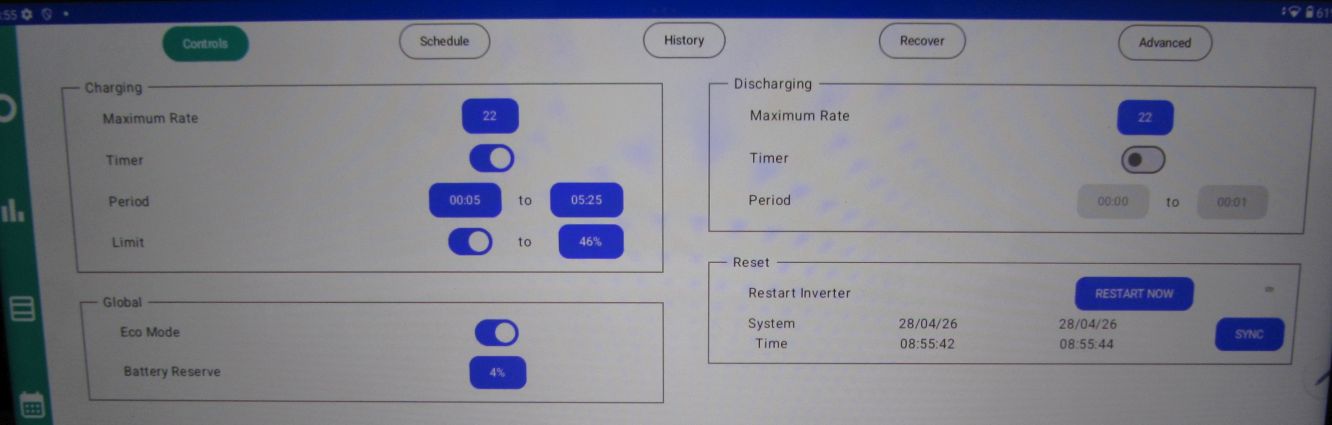
- controls-IMG_9261.jpg (53.88 KiB) Viewed 2219 times
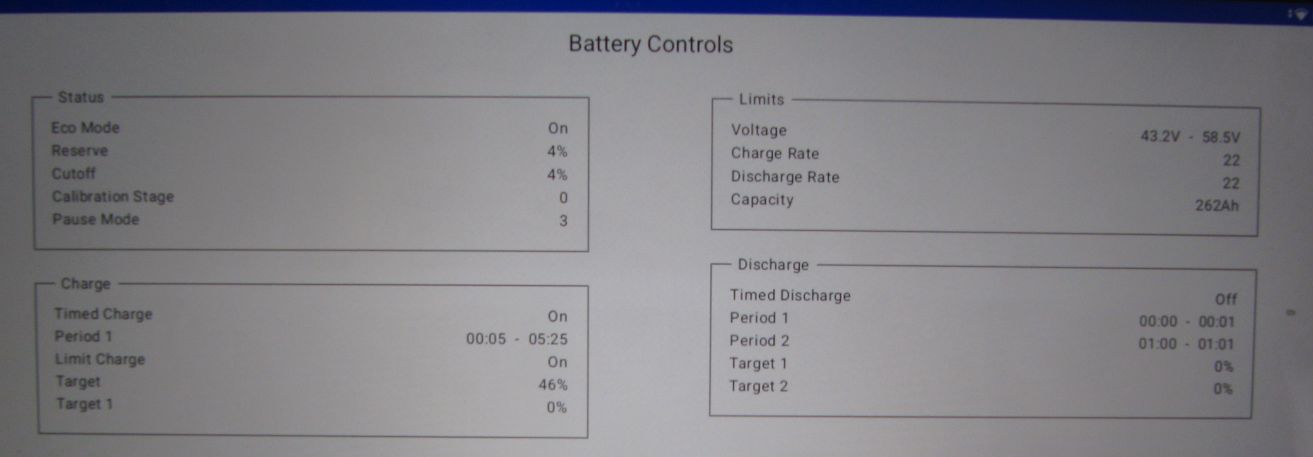
- controls-2-IMG_9260.jpg (42.53 KiB) Viewed 2219 times
.
could my odd system be related to the pre-release inverter firmware D0.214-A0.214 that is loaded?
The problem with the car charging is nothing to do with the battery either charging or discharging, the same problem appears for both situations.
The other day whilst running some tests with a scope the car charged with the battery in pause or not in pause.
However, today it does not want to charge with the battery on (and at 100%) doing the same tests.
I am trying to get octopus to come and have a look at correcting the dirty-power supply which is the most likely cause of the problem. My car probably has a low threshold for THD.
Re: How to 'pause' the battery and inverter for charge/discharge?
Posted: Wed Apr 29, 2026 12:45 am
by RubikCube
I certainly think it could be to do with the 214 firmware. Change log is here
https://givenergy2025.zohodesk.eu/porta ... rmware-log
I have no idea what "Fix grid/inverter balance issue with tighter control of the net-zero balance point." actually means, but it could be relevant.
Personally I would load 212 firmware, but you do so at your own risk, not because I told you to.
Interference can be strange. This article from Octopus might help. Phil Steele still works for Octopus as far as I know.
https://octopus.energy/blog/perils-work ... nnovators/
Good luck getting to the bottom of this.